Welcome to Wantek online store!

Announcement: Free shipping in USA, UK, FR, DE, IT, ES

usb headsets with microphone​

Single Ear Headsets with Mic for Work Calls

(14 products)

Shop Wantek single ear headsets when you want to keep one ear open while handling office calls, customer conversations or computer meetings.

This collection focuses on wired mono headsets with USB, RJ9, 3.5mm and 2.5mm connection options. Start with the device you use for calls, then confirm the connector before comparing fit, microphone design and controls.

View as

Start with the connection

Choose Your Headset by Device First

The connector is the first decision. Start with the device handling your calls, then confirm the connection before comparing models.

Calling device Connection to compare What to confirm
Computer or softphone USB or supported USB-C options Check the ports available on your computer
Compatible desk phone RJ9 variant Verify the exact phone model and required wiring
Device with headset jack 3.5mm or 2.5mm Confirm the device supports the exact headset connection

RJ9 requires verification. Do not choose an RJ9 headset from connector shape alone. Desk-phone headset wiring can vary between devices.

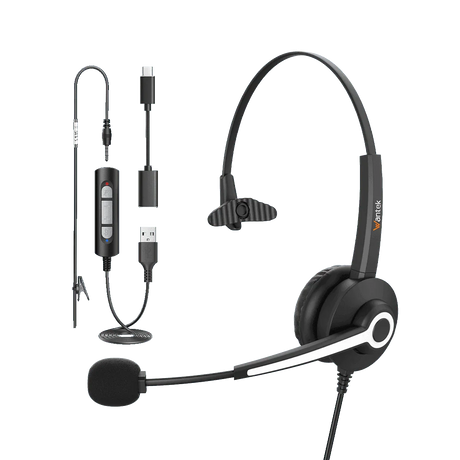
Wantek H783 single ear wired headset with boom microphone and connection adapters
Wantek H783 single-ear wired headset

Mono headset use

Why Choose a Single Ear Headset?

A single-ear headset—also called a mono or monaural headset—covers one ear while leaving the other open.

That design is useful when your work requires both call audio and awareness of the room, such as at a reception desk, support station, office phone or dispatch workspace.

Choose Single Ear for Awareness

Choose a single-ear headset when room awareness matters and you need to respond to coworkers, visitors, alerts or other activity around the workstation.

Choose Dual Ear for Focus

Choose a dual-ear headset when covering both ears and maintaining stronger focus is more important.

Compare Dual Ear Headsets →

Compare by connection

Compare Single Ear Headsets by Connection

Computer calls

USB Single Ear Headsets

Start with USB when calls are handled through a computer or softphone.

Some Wantek models provide more than one computer-device connection option, so check the individual product specification before ordering.

Browse USB Headsets →
Desk phones

RJ9 Single Ear Headsets

RJ9 models are intended for compatible desk-phone setups, but RJ-style connectors are not universally wired the same way.

Wantek lists RJ1, RJ2 and RJ4 variants in this collection. Confirm the exact phone model and compatible version before choosing one.

Browse RJ9 Headsets →
Check Desk Phone Compatibility →
Supported headset jacks

3.5mm and 2.5mm Single Ear Headsets

Choose these only when the calling device provides the corresponding headset connection.

A matching plug size alone does not establish complete device compatibility, so confirm the device and product specification first.

Wantek H681 single-ear headset shown for customer support and office calls

Wearing style

Single Ear vs Dual Ear Headsets

Choose Single Ear When You Need Room Awareness

A mono headset keeps one ear uncovered, which can help when you need to respond to coworkers, visitors, alerts or other activity around the workstation.

Typical use cases include reception desks, office phone stations, support roles and dispatch environments.

Choose Dual Ear When You Want Both Ears Covered

A dual-ear headset is the stronger starting point when you prefer audio in both ears or want fewer nearby conversations competing for your attention.

Compare Dual Ear Headsets →

Microphone and controls

Compare the Microphone and Call Controls

Do not treat every “noise cancelling” label as the same feature.

Noise-related terminology can describe microphone noise reduction, passive isolation or listening-side active noise cancellation. Check the specification for the exact model rather than assuming those functions are interchangeable.

Several current Wantek single-ear model specifications list a boom microphone, PNC and in-line volume and mute controls. Features vary by model and connection, so use the individual product page as the final reference.

Some RJ9 variants also include Quick Disconnect. If QD is important to your workflow, confirm that the exact product title and specification include it.

  • Microphone noise reduction A microphone-side function; confirm the exact model specification.
  • Passive isolation A different concept from electronic active noise cancellation.
  • Active noise cancellation A listening-side feature that should only be assumed when the exact product specification states it.

Work scenarios

Choose a Single Ear Headset by Work Scenario

Use case Starting point What matters most
Reception desk Single-ear wired headset Room awareness and exact phone or computer connection
PC meetings USB single-ear headset Computer port and call controls
Office desk phone Compatible RJ9 headset Exact phone model and wiring
Support or dispatch Mono headset with microphone Room awareness, connector and microphone placement
Shared or louder workspace Compare single and dual ear Decide whether awareness or greater isolation is more important

Before you choose

Before You Choose a Model

Start with three questions.

What device handles the call?

Computer, desk phone or another supported device?

Which connection does that device require?

USB, USB-C, RJ9, 3.5mm, 2.5mm or another supported path?

Do you need one ear open?

Choose single ear for greater room awareness or compare dual-ear models when both ears covered is a better fit.

Only after those decisions should price, fit and secondary features determine the final model.

Common questions

Frequently Asked Questions

What is a single ear headset?

A single-ear or mono headset uses one earpiece and leaves the other ear uncovered. It is commonly chosen when the user needs to hear both the call and activity around the workstation.

Is a single ear headset good for office calls?

Yes when room awareness is important. Reception, support, office-phone and dispatch roles are common examples, while users who want both ears covered may prefer a dual-ear headset.

Which connection should I choose for a computer?

Start with USB or another connection specifically supported by your computer and the headset. Check whether your device uses USB-A, USB-C or another headset connection before ordering.

Will any RJ9 headset work with my desk phone?

No. Similar modular connectors can use different wiring. Confirm the complete phone model and the required Wantek RJ9 variant before ordering.

What is the difference between single-ear and dual-ear headsets?

Single-ear headsets leave one ear open for greater awareness of the room. Dual-ear models cover both ears and are a better starting point when you prefer audio in both ears.

Do Wantek single-ear headsets have mute and volume controls?

Several listed Wantek single-ear models specify in-line volume control and one-key mute. Check the exact product specification because controls can vary by model and connection.

What does Quick Disconnect mean?

Quick Disconnect, or QD, allows a compatible headset section to disconnect from its lower cable without removing the headset. Only choose a QD model when the exact product specification confirms that feature.

Do wired single-ear headsets need charging?

Corded headsets in this collection use a wired connection rather than a Bluetooth battery connection. If you need wireless mobility, compare the wireless headset collection instead.

Continue by headset type

Move to the collection or guide that matches the device, wearing style or team workflow you need.

Compare /3

Loading...